Independent school administrators: creating coordinator accounts
Information for independent school administrators on how to create eduPass accounts to access the Premiers’ Reading Challenge application for the first time.
On this page
Find information for independent school administrators on how to set up the Premiers’ Reading Challenge.
Registering my school for the Challenge
Many schools have already:
- asked for access to the new Challenge application
- been sent their External Client Portal (ECP) eduPass details.
If your school has not registered yet, principals should ask for accounts for all staff members needing access to the Challenge application. Email readingchallenge@education.vic.gov.au.
Usernames and passwords for the previous Challenge application will not work.
The principal will choose one member of staff to be the Organisation Administrator. They’ll:
- manage access to eduPass accounts at your school
- be the default Super Coordinator of the Challenge.
In most schools, the Organisation Administrator should be the librarian or teacher with the day-to-day responsibility for administering the Challenge.
Principals can ask for eduPass accounts for other teachers/admin staff at the same time, if needed.
For more information, refer to:
Setting up your eduPass account
The Department will create your new accounts and email you information about how to complete the registration and activation process.
When the account is created, you’ll get an email with:
- an invitation link
- username
- temporary password.
You’ll be asked to choose your own password and set up some security questions and PIN. These will be used if you forget your password.
Once the Challenge Coordinator approves access, you can use your new username and password to access:
- the ECP Management application to manage users at your school – Organisation Administrators only
- the Challenge application– all new users.
Email invitation link issues
Invitation links for eduPass accounts are valid for 30 days. If your invitation link expires, contact the Service Desk. They’ll resend the invitation link to you.
- Email servicedesk@education.vic.gov.au
- Phone 1800 641 943
Organisation Administrators can resend invitation links to staff at their own school once their own access has been set up.
Managing eduPass accounts for users at your school
If you’re the Organisation Administrator for eduPass accounts, you can:
- search for a user
- reset a user’s password
- update a user’s details
- manage a user’s access
- promote a user to Organisation Administrator
- invite a new user to set up their eduPass account
- update your school’s details.
To complete these tasks, log in to the portal.
Find more information for Organisation Administrators.
Approving access for new eduPass users in the External Client Portal (ECP)
When the Organisation Administrator has invited new users to set up an eduPass account, their access to the Challenge application will need to be approved in the External Client Portal.
- Go to the External Client Portal.
- Log in using your eduPass (ECP) details.
- Select Organisation management.
- Select Edit next to your school name.
- Find the new user’s name and select Change and Approve.
- Select Confirm to save the changes.
Invite a new user to set up an eduPass account
The Organisation Administrator is able to invite other staff at your school to set up an eduPass account.
Log in to the eduPass community portal using your username and password.
- In the ‘My Organisation’ screen Tasks’ box, click ‘Invite new user to organisation’. You will be presented with the ‘Invite user’ screen.
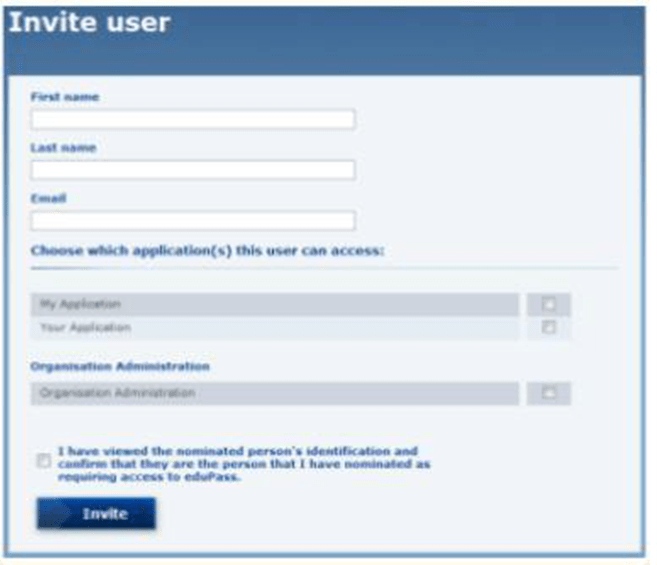
- Complete the user’s details (first name, last name, email) and select the Victorian Premiers’ Reading Challenge application they require access to.
- To give someone access to eduPass applications, you must have sighted their identification. Check the box to confirm you have done this. Then click ‘Invite’.
- You will be presented with the ‘My Organisation’ screen’ where the invitation you have just sent will show as a ‘Pending Invite’. You can cancel or resend this invitation at any time from this screen.
Removing access for users that have left the school in External Client Portal
When a user leaves the school, the Organisation Administrator should remove their access to External Client Portal.
- Go to the External Client Portal.
- Log in using your eduPass (ECP) details.
- Select Organisation management.
- Select Edit next to your school name.
- Find the user’s name and select Change and Remove access.
- Select confirm to save the changes.
Updated 26 March 2026
Related links
About the VIC Government
- The Premier and ministers
- Find a Vic Gov department, agency or service
- Strategies and policies
- Inquiries and royal commissions
Grants and programs
Jobs and careers
Arts, culture and heritage
Business and the workplace
- Mentally Healthy Workplaces Framework
- Portable Long Service Authority
- Victoria’s racing industry
- Workforce Inspectorate Victoria
- Liquor licensing, sale and supply
Communities
- Children
- First Peoples - State Relations
- Finding records
- Gender equality & women’s leadership
- LGBTIQA+ equality
- Multicultural communities
- Seniors Online
- Veterans support and commemoration
- Volunteering in Victoria
- Youth Central
Education and training
- Victorian Early Childhood Regulatory Authority
- Early childhood education – information for professionals
- Kinder: Best Start, Best Life
- Education – information for parents
- Schools.Vic - information for schools
- Education grants, programs, awards and events
- PROTECT
- TAFE, training and universities sector
- TAFE Victoria
- Victorian Skills Authority
- Apprenticeships Victoria
- Learn Local
Environment, water and energy
Finance and economy
Health and social support
- Family violence reform
- NDIS Worker Screening Check
- NDIS and disability services and support in Victoria
- Patient Review Panel
- Transforming Trauma Victoria
Housing and property
Law and justice
- Adoption
- Births, deaths and marriages
- Honorary justices
- Machete ban
- Safeguarding Victorians against terrorism
- Stolen Generations Reparations Package
- Victims of Crime
- Victorian Racing Tribunal
Safety and emergencies
- Emergency Recovery Victoria
- Victorian Emergency Relief and Recovery Foundation
- Emergency Recovery Resource Portal
- How well do you know fire
- Fire Services Reform
- Water safety
- Marine Search and Rescue
Science and technology
- Data sharing and open data
- Data.vic - discover and access Vic Gov open data
- Developer.Vic - portal for API developers
- Go.vic URL shortener
- Vic Gov IT project dashboard
- Victoria’s free public wi-fi network
- Cyber security in the Victorian Government
Sport and recreation
Traffic and transport
- Cameras Save Lives
- Transport Fines
- Getting Around
- Transport Planning
- Transport Future
- Climate Change and transport
- Future Directions For Transport
- Transport projects
- Ports and Freight
Working in the Victorian Government
- Single Digital Presence home
- Accommodation and Library Services
- Executive employment in the Victorian public sector
- Budget, procurement and funding
- Careers in the Victorian Government
- Council and Regulator Toolkit
- Guidelines for working in government
- Join a government network
- Standards and guidelines
- VicFleet CarPool
- Victorian Government style guide