Creating compliant email addresses - Instructions for private providers
On this page
- Step 1: Identifying your non-compliant email addresses in KIMS
- Step 2: Creating compliant email addresses
- Step 3: Updating KIMS with new compliant email addresses
The department is strengthening access requirements to meet best practice standards in information security.
Service providers are required to ensure all active KIMS users have a compliant email address by the beginning of November 2024. This will ensure changes are made prior to the annual KIMS end of year shutdown period.
KIMS and Arrival users will require:
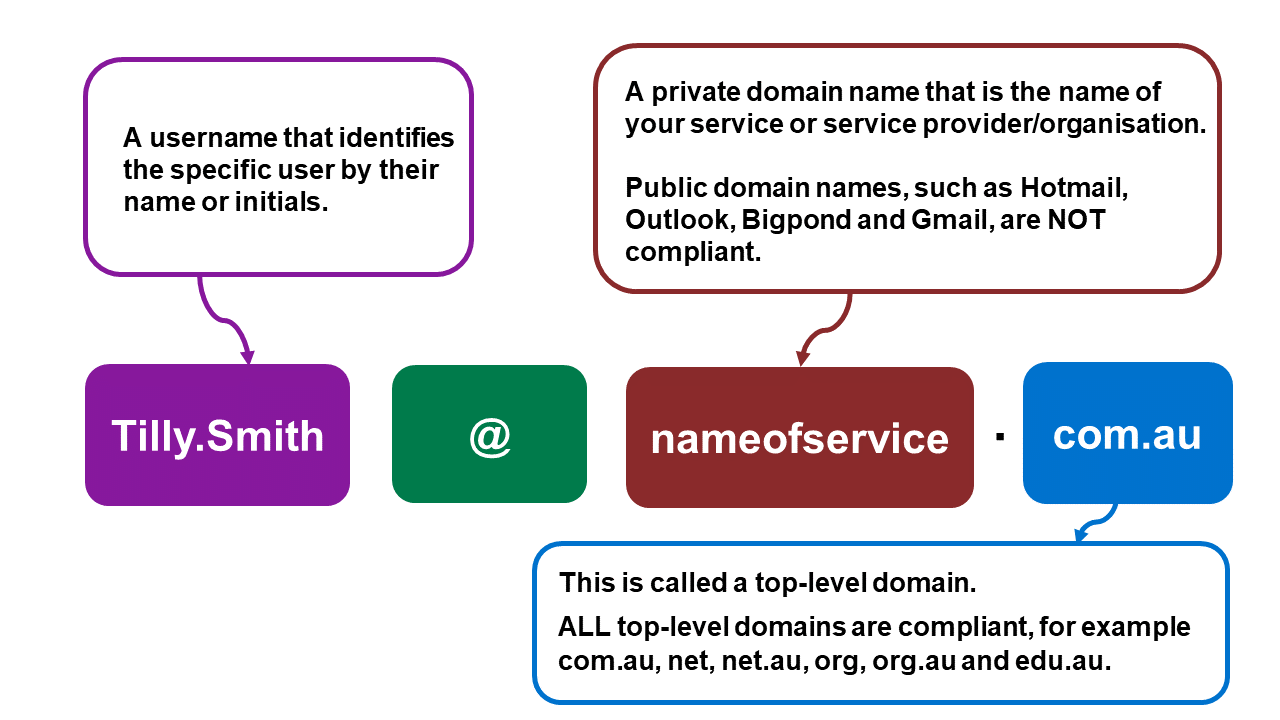
The steps on this page have been developed to support private providers to:
- Identify all your non-compliant email addresses in KIMS
- Register a private domain name (if required)
- Change non-compliant usernames so they are compliant
- Update non-compliant email addresses with new addresses in KIMS.
Step 1 and Step 3 below can only be completed by your service’s KIMS Service Provider Admin/s.
Where the steps refer to ‘users’ this means all KIMS users, including KIMS Service Provider Admins.
Step 1: Identifying your non-compliant email addresses in KIMS
Open all
- What is a compliant email address?
An email address is made up of a username and a domain name and both must be compliant.
Examples of compliant and non-compliant usernames:
| Compliant usernames | Non-compliant usernames |
|---|---|
| Tilly.smith@ | mykinder@ |
| t.smith@ | info@ |
| tillysmith@ | president@ |
| tsmith1999@ | director@ |
| tilly.smith1@ | admin@ |
| ts@ | |
| tilly.nameofkinder@ |
Examples of compliant and non-compliant domain names:
| Compliant domain names | Non-compliant domain names |
|---|---|
| @nameofyourserviceprovider.com.au | @hotmail.com |
| @nameofyourorganisation.com | @gmail.com |
| @nameofyourkindergarten.edu.au | @outlook.com |
| @bigpond.com | |
| If all users have compliant email addresses (both username and domain name) no further action is required. |
- Identifying your non-compliant email addresses in KIMS
-
Log into KIMS (Service Provider Admin access) If you have a large number of users, we have created a report of all their email addresses to make it easier to identify the non-compliant ones. To find and export this report:
-
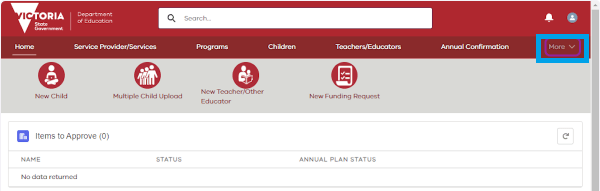
Click on ‘More’.
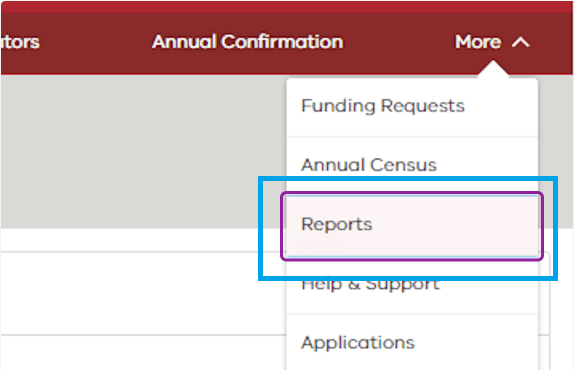
- Click on ‘Reports’.
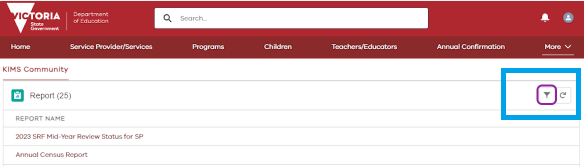
- Click on the toggle filter.
- Type in the word ‘user’.
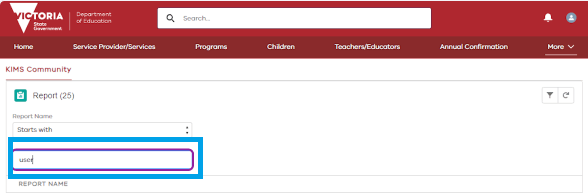
- Click on ‘User Management - Users’.
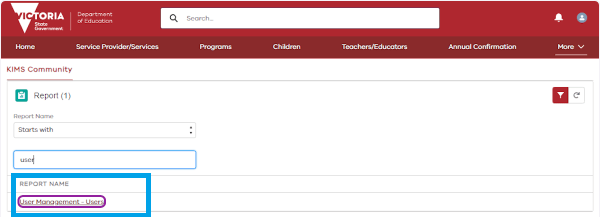
- Click on ‘Export’.
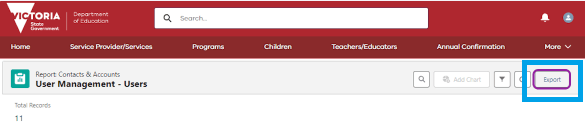
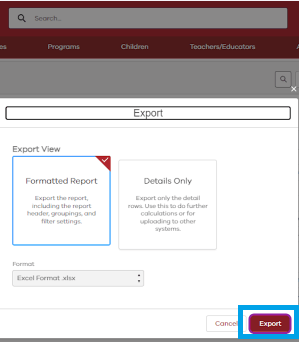
- Click on ‘Export’.
-
Export the report and identify the email addresses for active users that are not compliant. If any inactive KIMS users will need access to Arrival, you will also need to check and update their email addresses (if required). If you only have a small number of users, you can see all their email addresses on the ‘User Management’ page. To access this page:
-
Click on ‘Service Provider/Services’.
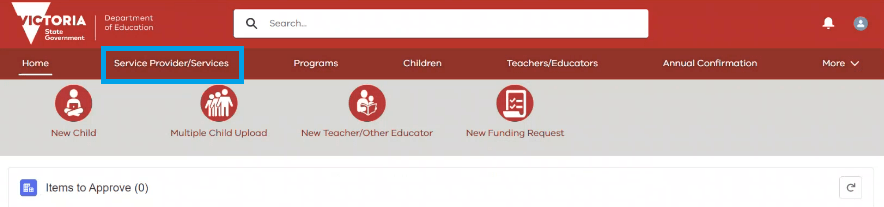
- Click on ‘User Management’.

- From your list of active users, identify the email addresses that are not compliant. If any inactive KIMS users will need access to Arrival, you will also need to check and update their email addresses (if required).
Step 2: Creating compliant email addresses
Open all
- If none of your users have a compliant domain name
- You will need to register for a private domain name and set up a business email account
- Information about how to set up your own business email account can be found on the Business Victoria website
- edu.au domain licences are available to recognised Australian education and training providers, projects and programs, including childcare centres and preschools, government and non-government schools, universities and higher education providers, Registered Training Organisations, bodies serving overseas students, peak bodies and professional associations. Contact the Domain Register for support
- When you set up email addresses with your new private domain name, remember to make sure the usernames are also compliant.
- If users have a compliant domain name but their usernames are not compliant
- Check if the user has an existing compliant email address that can be used instead, for example their email address in KIMS is manager@ or admin@ but they also have a work email address with a compliant username
- If they don’t have an existing compliant email address, contact your email or web host to update the user’s email address with a compliant username.
- If some users have a private domain name but other users have a non-compliant domain name
- Contact your email or web host for support to create additional email addresses.
Step 3: Updating KIMS with new compliant email addresses
- Updating KIMS with new email addresses
- Log into KIMS.
- Click on ‘Service Provider/Services’.
- Click on ‘User Management’.
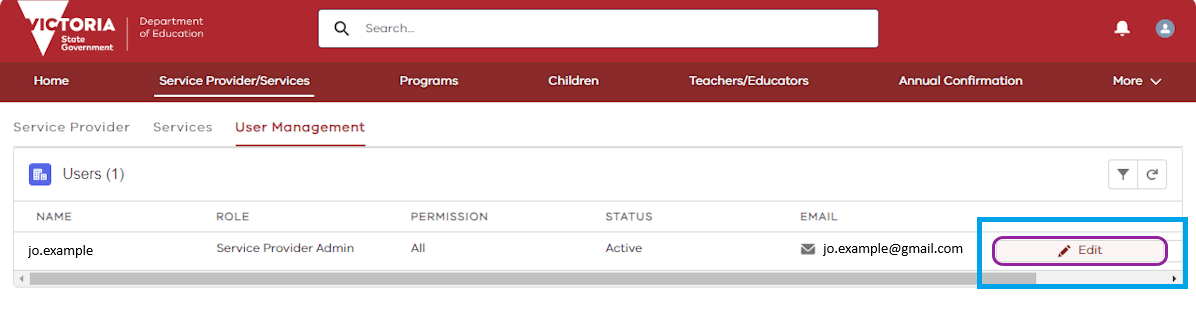
- On the ‘User Management’ page, find the user whose email address you need to update.
- Click on the ‘Edit’ tab on the right-hand side of the page.
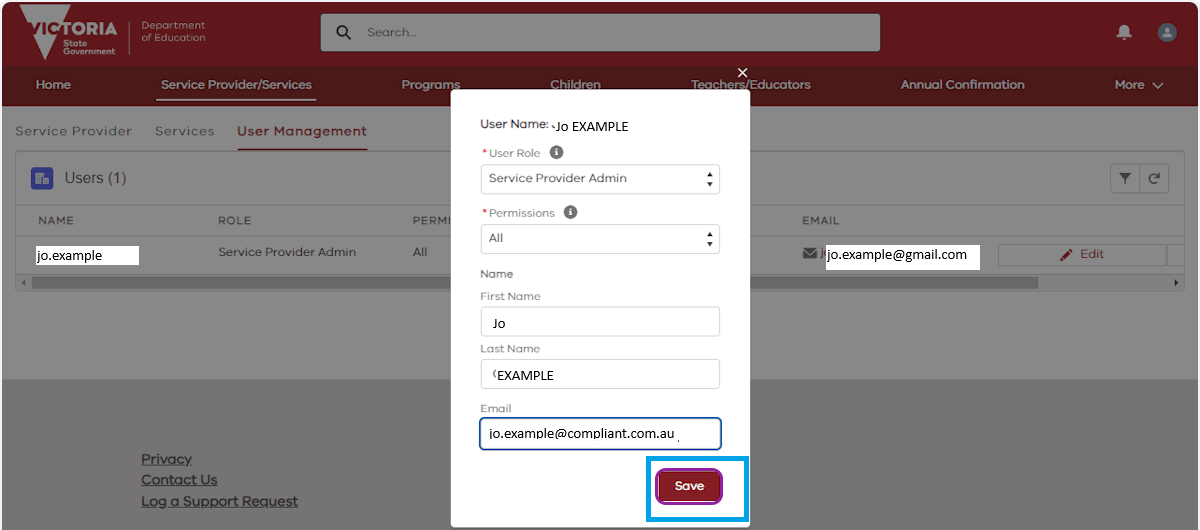
- Delete the non-compliant email address, add in the new email address and click ‘Save’.
- Click ‘Ok’.
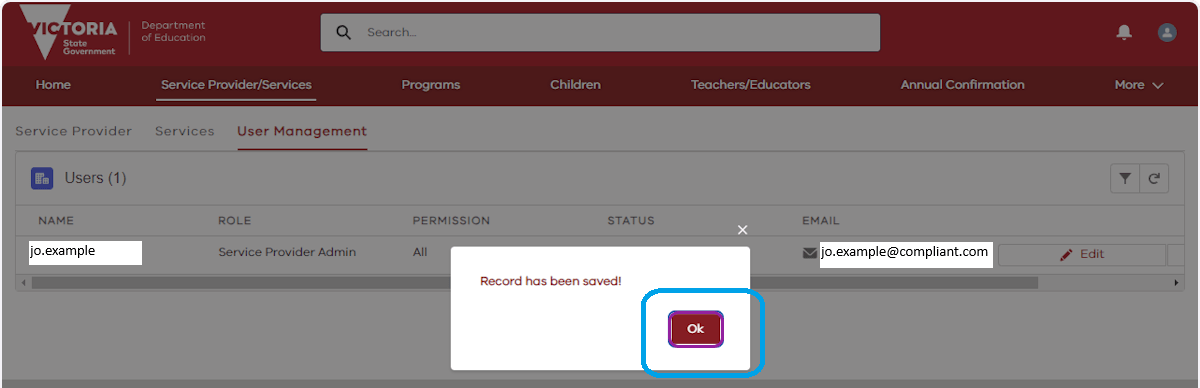
- The email address is now updated.
- Remember to let staff know that their email addresses have been updated in KIMS. New email addresses can also be used for other work purposes if you wish. If you have any problems with this step, please contact the Health and Early Learning Practitioners Helpdesk on 1800 614 810 or via the helpdesk portal.
Updated 27 March 2026
Related links
About the VIC Government
- The Premier and ministers
- Find a Vic Gov department, agency or service
- Strategies and policies
- Inquiries and royal commissions
Grants and programs
Jobs and careers
Arts, culture and heritage
Business and the workplace
- Mentally Healthy Workplaces Framework
- Portable Long Service Authority
- Victoria’s racing industry
- Workforce Inspectorate Victoria
- Liquor licensing, sale and supply
Communities
- Children
- First Peoples - State Relations
- Finding records
- Gender equality & women’s leadership
- LGBTIQA+ equality
- Multicultural communities
- Seniors Online
- Veterans support and commemoration
- Volunteering in Victoria
- Youth Central
Education and training
- Victorian Early Childhood Regulatory Authority
- Early childhood education – information for professionals
- Kinder: Best Start, Best Life
- Education – information for parents
- Schools.Vic - information for schools
- Education grants, programs, awards and events
- PROTECT
- TAFE, training and universities sector
- TAFE Victoria
- Victorian Skills Authority
- Apprenticeships Victoria
- Learn Local
Environment, water and energy
Finance and economy
Health and social support
- Family violence reform
- NDIS Worker Screening Check
- NDIS and disability services and support in Victoria
- Patient Review Panel
- Transforming Trauma Victoria
Housing and property
Law and justice
- Adoption
- Births, deaths and marriages
- Honorary justices
- Machete ban
- Safeguarding Victorians against terrorism
- Stolen Generations Reparations Package
- Victims of Crime
- Victorian Racing Tribunal
Safety and emergencies
- Emergency Recovery Victoria
- Victorian Emergency Relief and Recovery Foundation
- Emergency Recovery Resource Portal
- How well do you know fire
- Fire Services Reform
- Water safety
- Marine Search and Rescue
Science and technology
- Data sharing and open data
- Data.vic - discover and access Vic Gov open data
- Developer.Vic - portal for API developers
- Go.vic URL shortener
- Vic Gov IT project dashboard
- Victoria’s free public wi-fi network
- Cyber security in the Victorian Government
Sport and recreation
Traffic and transport
- Cameras Save Lives
- Transport Fines
- Getting Around
- Transport Planning
- Transport Future
- Climate Change and transport
- Future Directions For Transport
- Transport projects
- Ports and Freight
Working in the Victorian Government
- Single Digital Presence home
- Accommodation and Library Services
- Executive employment in the Victorian public sector
- Budget, procurement and funding
- Careers in the Victorian Government
- Council and Regulator Toolkit
- Guidelines for working in government
- Join a government network
- Standards and guidelines
- VicFleet CarPool
- Victorian Government style guide