Multi-User Portal Access
We have introduced new features to the Portal to make it easier for multiple users to manage licence processes on behalf of an organisation.
Portal users can now:
- Register an organisation with the Workforce Inspectorate, creating an Organisation Portal Profile
- Add other users to the Organisation Portal Profile, to help manage licence applications, variations and notifications
- Update the membership type for each user, managing what functions each user can perform
- Be added to multiple Organisation Portal Profiles, managing functions for multiple organisations from one Portal dashboard
Register an Organisation
- If you have a current child employment licence:
Next time you log in to the Portal to:
- Notify us of child under 15 being employed under your current licence
- Request a variation to your licence
You will first need to click ‘Create Organisation Profile’ to enable the new Portal features.
User Guide - Creating an Organisation Profile 2025 PDF 278.55 KB (opens in a new window)
User Guide - Creating an Organisation Profile 2025 Word 342.16 KB (opens in a new window)
When you have created your Organisation Profile it will appear on your Portal homepage under ‘My Submissions’. You then have the option to add other users to your account, who can also manage licence applications, variations and notifications on behalf of the organisation.
Log in to our online portal(opens in a new window)
- If you do not have a current child employment licence:
Before applying for a licence, you will first need to register your organisation with us.
After you log in to the Portal, select ‘Register My Organisation’ and fill your details and the details for the organisation you want to register.
User Guide - Register an Organisation 2025 PDF 148.48 KB (opens in a new window)
User Guide - Register an Organisation 2025 Word 223.05 KB (opens in a new window)
When your registration has been processed and approved, your organisation will appear on your Portal homepage under ‘My Submissions’. Please allow two (2) business days for us to review your request.
You will then be able to:
- Apply for a licence
- Add other users to the Organisation Portal Profile, to help manage licence applications, variations and notifications
- Update the membership type for each user, managing what functions each user can perform
Log in to our online portal(opens in a new window)
Managing Access to an Organisation
Multiple users can now be associated with an Organisation Portal Profile with varying access levels, to manage the organisation’s account and licence processes.
Below is an overview of the three Membership Types and the functions they can perform:
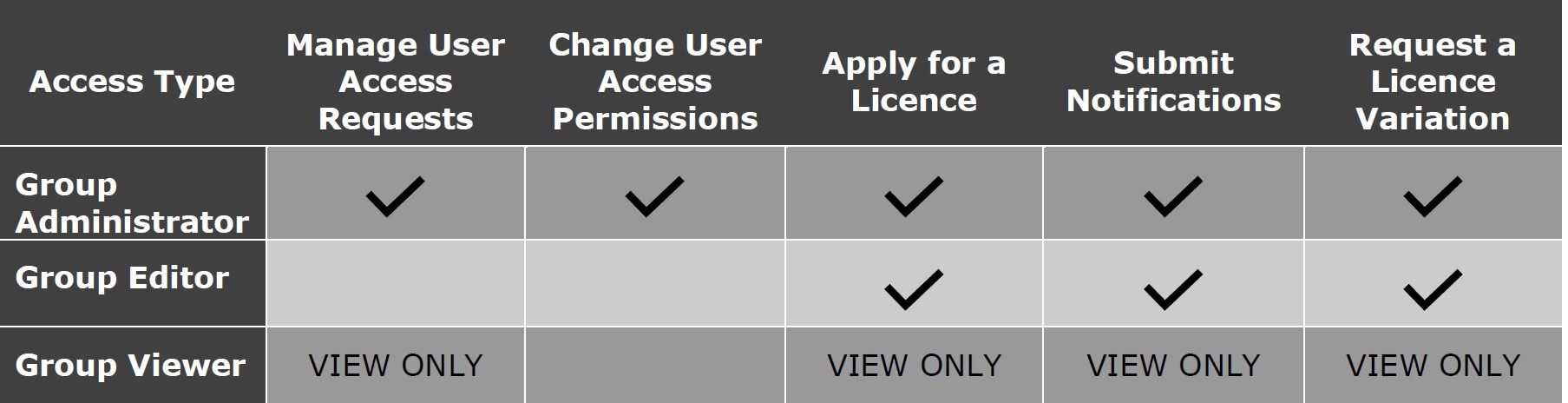
The Group Administrator will be the user who Registered the Organisation, or the user log-in associated with an existing licence holder. This can be updated by the Group Administrator, who can select other Group Administrators, Editors and Viewers for the organisation.
Users can be added to an Organisation Portal Profile in two ways:
- The Group Administrator can search for the user’s Portal email address and add them
- The user can search for the Organisation and send an ‘Access Request’ for the Group Administrator to approve
See our step-by-step guide to managing access to an Organisation Portal Profile:
User Guide - Add New Users or Request Access 2025 PDF 312.85 KB (opens in a new window)
User Guide - Add New Users or Request Access 2025 Word 314.51 KB (opens in a new window)
Log in to our online portal(opens in a new window)
Updated 22 December 2025
Related links
- Employing children under 15 years old
- Apply for a child employment licence
- Online Portal
- Employing children in entertainment
About the VIC Government
- The Premier and ministers
- Find a Vic Gov department, agency or service
- Strategies and policies
- Inquiries and royal commissions
Grants and programs
Jobs and careers
Arts, culture and heritage
Business and the workplace
- Mentally Healthy Workplaces Framework
- Portable Long Service Authority
- Victoria’s racing industry
- Workforce Inspectorate Victoria
- Liquor licensing, sale and supply
Communities
- Children
- First Peoples - State Relations
- Finding records
- Gender equality & women’s leadership
- LGBTIQA+ equality
- Multicultural communities
- Seniors Online
- Veterans support and commemoration
- Volunteering in Victoria
- Youth Central
Education and training
- Victorian Early Childhood Regulatory Authority
- Early childhood education – information for professionals
- Kinder: Best Start, Best Life
- Education – information for parents
- Schools.Vic - information for schools
- Education grants, programs, awards and events
- PROTECT
- TAFE, training and universities sector
- TAFE Victoria
- Victorian Skills Authority
- Apprenticeships Victoria
- Learn Local
Environment, water and energy
Finance and economy
Health and social support
- Family violence reform
- NDIS Worker Screening Check
- NDIS and disability services and support in Victoria
- Patient Review Panel
- Transforming Trauma Victoria
Housing and property
Law and justice
- Adoption
- Births, deaths and marriages
- Honorary justices
- Machete ban
- Safeguarding Victorians against terrorism
- Stolen Generations Reparations Package
- Victims of Crime
- Victorian Racing Tribunal
Safety and emergencies
- Emergency Recovery Victoria
- Victorian Emergency Relief and Recovery Foundation
- Emergency Recovery Resource Portal
- How well do you know fire
- Fire Services Reform
- Water safety
- Marine Search and Rescue
Science and technology
- Data sharing and open data
- Data.vic - discover and access Vic Gov open data
- Developer.Vic - portal for API developers
- Go.vic URL shortener
- Vic Gov IT project dashboard
- Victoria’s free public wi-fi network
- Cyber security in the Victorian Government
Sport and recreation
Traffic and transport
- Cameras Save Lives
- Transport Fines
- Getting Around
- Transport Planning
- Transport Future
- Climate Change and transport
- Future Directions For Transport
- Transport projects
- Ports and Freight
Working in the Victorian Government
- Single Digital Presence home
- Accommodation and Library Services
- Executive employment in the Victorian public sector
- Budget, procurement and funding
- Careers in the Victorian Government
- Council and Regulator Toolkit
- Guidelines for working in government
- Join a government network
- Standards and guidelines
- VicFleet CarPool
- Victorian Government style guide