Order an honorary justice photo identification card
On this page
If you wish to request a new photo ID card, please write to HJSS at JP@justice.vic.gov.au and provide the following details:
- Your full name
- Your HJ registration number
- Your current postal address (to ensure your card arrives at the correct address)
- A digital photo. Follow these instructions below on how to take a new photo
Photo ID cards - examples
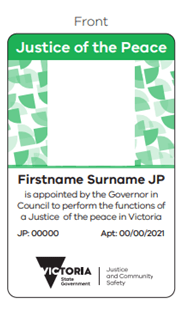
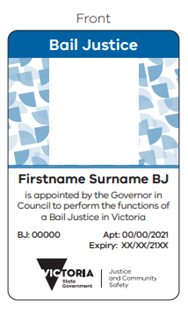
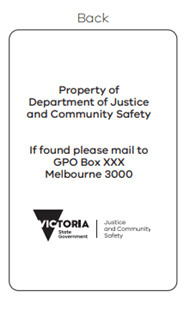
How to take a good digital photo
As a representative of the Department of Justice and Community Safety, it’s important that your identification photos are professional, clear and of an acceptable quality.
Ask a friend for help
It’s much easier to take an acceptable photo with someone else’s help. Alternatively, you can purchase passport-quality photographs instantly at participating Post Offices or Officeworks stores.
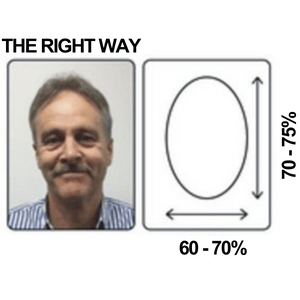
- Minimum dimensions: 900 x 1200 pixels
- File size: greater than 500KB and less than 3MB
- Portrait orientation
- Face fills 75% of photo
- In focus and clearly visible
JPG, PNG, PCT file formats are accepted.
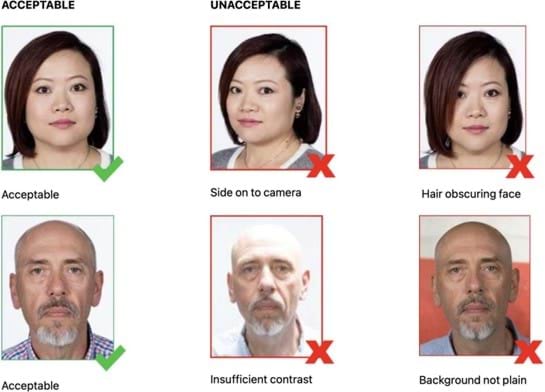
Steps to follow when someone else is taking your photo with a camera or mobile phone
Set up – Lighting
- Find a well-lit space with a plain light-coloured background – for example, pale greys and blues work better than white
- Avoid standing directly under a light source as it can create glare and shadows
- Your light source will be most effective behind and above your photographer.
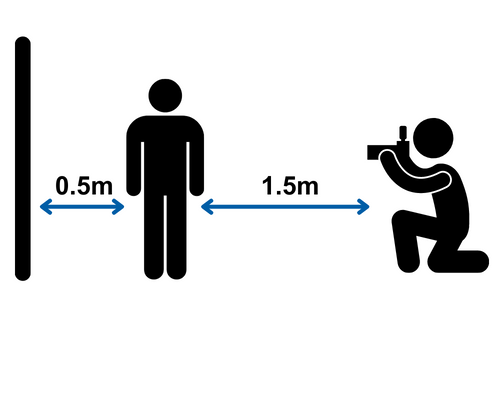
Set up – Where to stand
- Stand 0.5 metres in front of your background, to help reduce shadows
- The photographer should stand 1.5 metres away from you, to help keep your facial features in focus
- The photographer should hold the camera at your eye level, to help you avoid tilting your head up or down
- Select your best photo to download to your computer or laptop to print or email.
Taking the photo with your mobile phone
- Open the camera on the mobile device and take the photo
- It may take a couple attempts to get a clear photo with neutral expression, no blur and no shadows behind you
- Open the Photos application on your phone and select your best photo.
Edit your photo
- Press the appropriate Edit button.
Straighten your photo
- If needed, straighten your image by dragging the Straighten dial under (usually under the photo).
Crop and zoom your photo
- You should be able to see your shoulders and gap around your head, including hair and ears
- Drag any corner of the frame to crop the image.
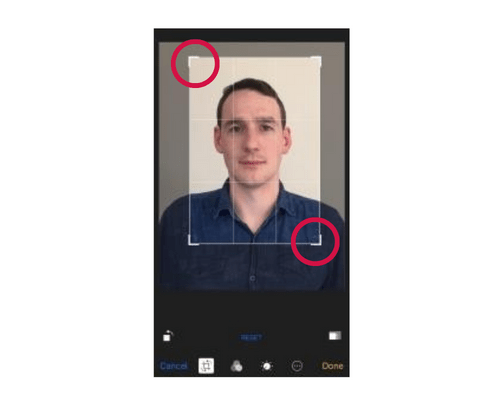
Save your photo
- When you are happy with the changes, press Done.
Email the photo to yourself
- Send the photo to yourself using your phone’s email function. (Other applications may compress the file, making it unsuitable)
- Send it as the actual size to maintain high quality of photo.
- Enter the appropriate email address, then press Send.
Save the photo from your email
- Log in to your email account on a computer or laptop
- Open the email and the attached photo, and then save your photo
- Save your photo somewhere you can easily find it again, such as your desktop.
Updated 29 August 2025
About the VIC Government
- The Premier and ministers
- Find a Vic Gov department, agency or service
- Strategies and policies
- Inquiries and royal commissions
Grants and programs
Jobs and careers
Arts, culture and heritage
Business and the workplace
- Mentally Healthy Workplaces Framework
- Portable Long Service Authority
- Victoria’s racing industry
- Workforce Inspectorate Victoria
- Liquor licensing, sale and supply
Communities
- Children
- First Peoples - State Relations
- Finding records
- Gender equality & women’s leadership
- LGBTIQA+ equality
- Multicultural communities
- Seniors Online
- Veterans support and commemoration
- Volunteering in Victoria
- Youth Central
Education and training
- Victorian Early Childhood Regulatory Authority
- Early childhood education – information for professionals
- Kinder: Best Start, Best Life
- Education – information for parents
- Schools.Vic - information for schools
- Education grants, programs, awards and events
- PROTECT
- TAFE, training and universities sector
- TAFE Victoria
- Victorian Skills Authority
- Apprenticeships Victoria
- Learn Local
Environment, water and energy
Finance and economy
Health and social support
- Family violence reform
- NDIS Worker Screening Check
- NDIS and disability services and support in Victoria
- Patient Review Panel
- Transforming Trauma Victoria
Housing and property
Law and justice
- Adoption
- Births, deaths and marriages
- Honorary justices
- Machete ban
- Safeguarding Victorians against terrorism
- Stolen Generations Reparations Package
- Victims of Crime
- Victorian Racing Tribunal
Safety and emergencies
- Emergency Recovery Victoria
- Victorian Emergency Relief and Recovery Foundation
- Emergency Recovery Resource Portal
- How well do you know fire
- Fire Services Reform
- Water safety
- Marine Search and Rescue
Science and technology
- Data sharing and open data
- Data.vic - discover and access Vic Gov open data
- Developer.Vic - portal for API developers
- Go.vic URL shortener
- Vic Gov IT project dashboard
- Victoria’s free public wi-fi network
- Cyber security in the Victorian Government
Sport and recreation
Traffic and transport
- Cameras Save Lives
- Transport Fines
- Getting Around
- Transport Planning
- Transport Future
- Climate Change and transport
- Future Directions For Transport
- Transport projects
- Ports and Freight
Working in the Victorian Government
- Single Digital Presence home
- Accommodation and Library Services
- Executive employment in the Victorian public sector
- Budget, procurement and funding
- Careers in the Victorian Government
- Council and Regulator Toolkit
- Guidelines for working in government
- Join a government network
- Standards and guidelines
- VicFleet CarPool
- Victorian Government style guide