Education and management permits
Victorians undertaking education or management activities involving native flora and fauna may require a permit.
On this page
- Pre-application checklist
- Activity on land managed by Parks Victoria
- Mapshare instructions
- PDF application forms
Permits for education or management purposes may be required under the following acts:
- Wildlife Act 1975
- Flora and Fauna Guarantee Act 1988
- Forests Act 1958
An education and management permit may be required for activities which involve:
-
Disturbing, capturing, marking, translocating, keeping, sampling, or destroying native wildlife, protected fish, freshwater crayfish, or aquatic invertebrates
-
protected or threatened flora.
These permits cover a range of purposes including education, propagation, general surveys, Aboriginal cultural purposes and management activities. Examples include:
-
Schools or universities keeping native wildlife for educational purposes
-
Consultants relocating native wildlife or removing protected flora during construction or development
-
Seed collection for nurseries
If you are conducting scientific research on Victoria’s flora and fauna, please apply for a research permit here(opens in a new window).
Activity conducted on public land managed by Parks Victoria may also require an access agreement from Parks Victoria.
Pre-application checklist
To determine what permits or permissions may be required, a simple online tool has been developed to assist planning.
The checklist takes approximately 3 to 5 minutes to complete. A copy of the results can be emailed to you for your records.
Access the pre-application checklist.
Open all
- Wildlife
Any activities where wildlife will be disturbed, captured, marked, translocated, kept, sampled or destroyed for education or management purposes requires a permit under the Wildlife Act 1975.
For wildlife activities for education or management purposes, please use the ‘Apply now for an Education and Management permit’ button below.
Animal welfare and animal ethics approvals
Some wildlife research may also require approval Animal Ethics Committee approval to meet requirements under the Prevention of Cruelty to Animals Act 1986 or any other relevant legislation. For more information on animal ethics approvals visit Agriculture Victoria.
Researchers must comply with all requirements of the Australian Animal Welfare Standards Code of Practice.
Where animal ethics approval is required, applicants must include both a copy of the animal ethics application and approval from an Animal Ethics Committee.
- Protected fish, freshwater crayfish and aquatic invertebrates
Permits are required for activities that impact protected fish under the Flora and Fauna Guarantee Act 1988.
For education or management activities involving protected fish, freshwater crayfish or aquatic invertebrates, please use the ‘Apply now for an Education and Management permit’ button below.
Approval may also be required under the Fisheries Act 1995. For more information visit Victorian Fisheries Authority.
For more information about species protected under the Flora and Fauna Guarantee Act visit the DEECA website.
- Protected and threatened flora
Permits are required for activities that impact protected and threatened flora listed under the Flora and Fauna Guarantee Act 1988. A permit is required for activities involving the disturbance and/or taking of protected and threatened flora for education, nursery propagation, and re-vegetation purposes
Flora includes fungi and lichen listed under the Flora and Fauna Guarantee Act 1988.
If you intend on conducting the activity in State forest, you may also require a Forest Produce Licence under the Forests Act 1958. These permits are for the cut, dig or take of forest produce, including plants. You can apply for this at the same time as your education or management permit below. For more information, please visit Forest Produce Licenceand our frequently asked questions related to applications requiring a Forest Produce Licence.
The application form and accompanying guidance note for the following proposal types are provided on the DEECA website:
- Incidental take of Protected Flora on public land – where plants are removed but not collected or used for personal use (e.g. as part of development activities).
- Take of Protected Flora on public land for personal use – such as collecting or propagating plants, or using them for food, fibre or display.
- Removal of grasstrees, tree-ferns and sphagnum moss from private property For more information, visit the DEECA website.
Apply now for an Education and Management permit
Activity on land managed by Parks Victoria
Research permits are no longer issued under the National Parks Act 1975. For research, education and management activities in parks and waterways managed by Parks Victoria, researchers can apply for an Access Agreement.
Certain activities being conducted on Parks Victoria managed land may also require a permit under the Wildlife Act 1975 or Flora and Fauna Guarantee Act 1988. Using the pre-application checklist will help you determine whether you need to apply for a permit.
How do I work out who manages the public land I propose to work on?
The relevant land manager of public land in Victoria can be found on MapShareVic using the instructions attached below.
Mapshare instructions PDF 4.86 MB (opens in a new window)
Mapshare instructions
This guide provides simple step by step instructions to use MapShareVic.
Researchers can use the MapShareVic tool to determine the relevant public land manager.
Some research activities on public land may require permission from the relevant land manager prior to undertaking any approved research activities, even if a permit under the Wildlife Act 1975 or the Flora and Fauna Guarantee Act 1988 has been issued.
Open all
- Identifying land manager
- Start from the MapshareVic Home Page and set up the correct spatial layers following Steps 2 to 5.
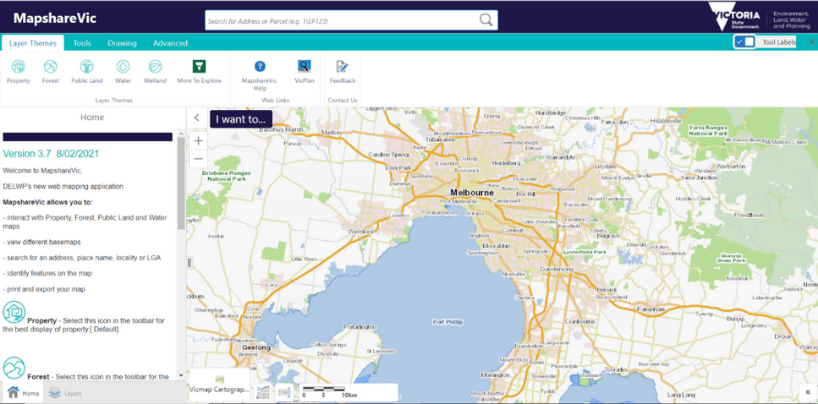
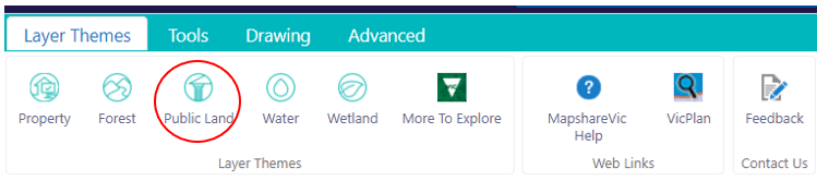
- Select the Layer Themes tab, and click on ‘Public Land’.
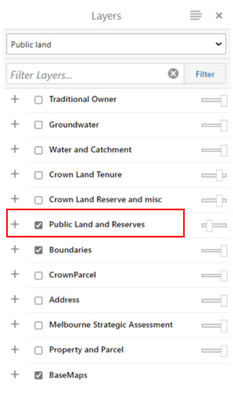
- A drop-down menu will appear on the left-hand side of the map. Untick all boxes except ‘Public Land and Reserves’. (‘Boundaries’ and ‘BaseMaps’ can be ticked, as these only provide geographical references and won’t impact the results generated).
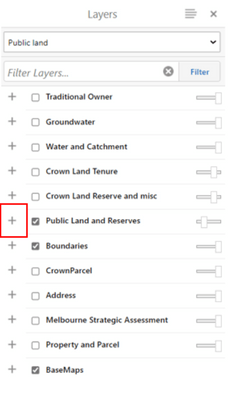
- Expand the ‘Public Land and Reserves’ layer by clicking on the ‘+’ sign.
- Ensure only ‘Public Land’ is ticked.
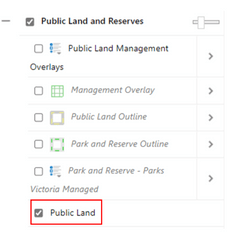
- Find the desired land parcel on the map by typing the park or reserve name in the search box. This will automatically focus the map on the area selected. Alternatively, use the cursor to manually move the map until you located the desired area. Right-click the desired land parcel. This action will drop a pin and open a menu on the map. From this menu, click on ‘Identify’.
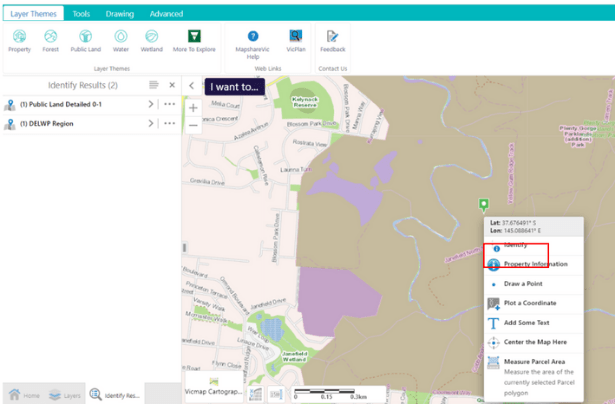
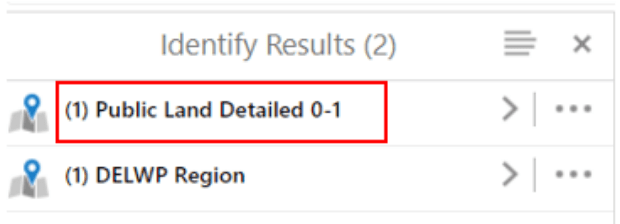
- A drop-down menu will appear to the left of the map. Click on ‘Public Land Detailed 0-1’
- Click on the name of the selected land parcel.
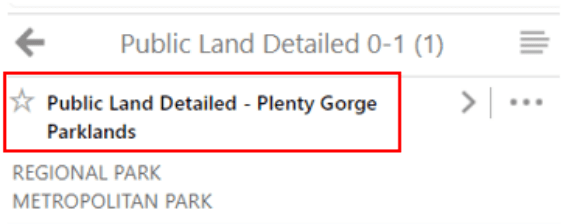
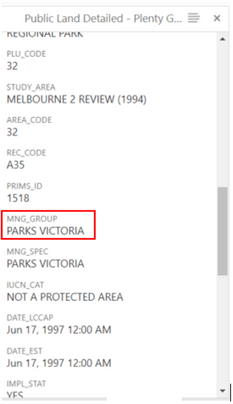
- To identify the land manager of the area selected, scroll down to the heading ‘MNG_GROUP’ on the menu to the left of the map.
End of Instructions
- Identifying reference areas
Reference Areas are areas of public land that have been established under the Reference Areas Act 1978 (Vic). Reference Areas include typical examples of land types that have not been modified for productive uses such as agriculture, mining or timber production in the past.
Please note that additional requirements apply when conducting research within Reference Areas. For further information please contact environmental.research@delwp.vic.gov.au.
- Start from the MapshareVic Home Page and set up the correct layers following steps 2 to 5.

- Select the ‘Layer Themes’ tab, and click on ‘Public Land’.

- A drop-down menu will appear on the left-hand side of the map. Ensure the layer ‘Public Land and Reserves’ is ticked.

- Expand the layer ‘Public Land and Reserves’ by clicking on the ‘+’ sign.

- Ensure ‘Public Land Management Overlays’ is ticked. This is the overlay that will show Reference Areas on the map. MapShare is now correctly set up to display information on Reference Areas.
.png)
- Find the desired land parcel on the map by typing the park or reserve name in the search box. This will automatically focus the map on the area selected. Alternatively, use the cursor to manually move the map until you located the desired area. Right-click the desired land parcel. This action will drop a pin and open a menu on the map. From this menu, click on ‘Identify’.
_0.png)
- A menu will open on the left-hand side of the map. Click on ‘Public Land Management Overlays’. Please note that if the menu only displays the option ‘Public Land Detailed’ and not the option ‘Public Land Management Overlays’ as shown in the image below, the land parcel selected is not a Reference Area.
.png)
- Click on the name of the selected land parcel.
.png)
- To verify that the land parcel is a Reference Area, scroll down to the heading ‘REC_CAT’ on the menu to the left of the map.
.png)
End of Instructions
- Identifying multiple land parcels and exporting results
- Start from the MapshareVic Home Page and set up the correct layers following steps 2 to 5.
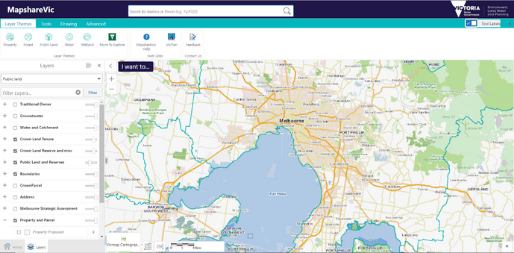
- Select the ‘Tools’ tab, and click on ‘Identify’.
_0.png)
- Click on ‘Enable Add Results’, then on ‘Identifiable Layers’.
.png)
- A menu will open on the left-hand side of the map. Expand the layer ‘Public Land and Reserves’ by clicking on the ‘+’ sign next to it.
.png)
- The menu will expand to reveal more options. Expand the ‘Public Land’ layer by clicking the ‘+’ sign next to it.
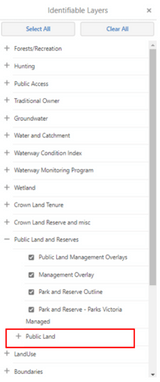
- The menu will expand to reveal more options. Ensure all boxes in the ‘Public Land’ layer are ticked. You are now ready to select and identify multiple land parcels.
.png)
- Find the desired land parcel on the map by typing the park or reserve name in the search box. This will automatically focus the map on the area selected. Alternatively, use the cursor to manually move the map until you locate the desired area. Right-click the desired land parcel. This action will drop a pin and open a menu on the map. From this menu, click on ‘Identify’.
.png)
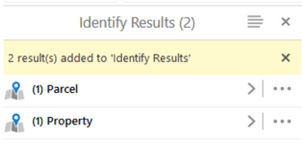
- A menu on the left-hand side of the map will open and show a summary of land parcel(s) selected and identified.
- Repeat Step 7 for each land parcel you want to select. You must hit the ‘identify’ button between each land parcel you select.
.png)
- After a new land parcel is identified, the menu on the left updates with new information.
.png)
- Once you have selected all land parcels, click the symbol with four grey lines from the menu.
.png)
- A menu will open on the left-hand side of the map. Click on Export to XLSX.
.png)
- A pop-up window will open and ask to confirm the download of the Excel file containing information on all land parcels selected. Click ‘Ok’ to being the download.
.png)
- To view a summary of all selected land parcels, click on ‘Switch to Table’ at Step 12.
.png)
- This will change view to show information on all selected parcels in a table at the bottom of the map.
.png)
End of Instructions
PDF application forms
Open all
- Wildlife
Any activities where wildlife will be disturbed, captured, marked, translocated, kept, sampled or destroyed for research, education or management purposes requires a permit under the Wildlife Act 1975.
For wildlife activities for education or management purposes, please use this application form
Wildlife education and management application form PDF 673.34 KB (opens in a new window)
Animal welfare and animal ethics approvals
Some wildlife activity may also require approval Animal Ethics Committee approval to meet requirements under the Prevention of Cruelty to Animals Act 1986 or any other relevant legislation. For more information on animal ethics approvals visit Agriculture Victoria.
Applicants must comply with all requirements of the Australian Animal Welfare Standards Code of Practice.
Where animal ethics approval is required, applicants must include both a copy of the animal ethics application and approval from an Animal Ethics Committee.
- Protected fish, freshwater crayfish and aquatic invertebrates
Permits are required for activities that impact protected fish under the Flora and Fauna Guarantee Act 1988.
For education or management activities involving protected fish, freshwater crayfish or aquatic invertebrates, please use this application form
Listed fish education and management application form PDF 1.01 MB (opens in a new window)
Approval may also be required under the Fisheries Act 1995. For more information visit Victorian Fisheries Authority.
For more information about species protected under the Flora and Fauna Guarantee Act visit the DEECA website.
- Protected and threatened flora
Permits are required for activities that impact protected and threatened flora listed under the Flora and Fauna Guarantee Act 1988. A permit is required for activities involving the disturbance and/or taking of protected and threatened flora for research, education, nursery propagation and re-vegetation purposes.
Flora includes fungi and lichen listed under the Flora and Fauna Guarantee Act 1988.
For education or management activities involving protected or threatened flora, please use this application form
Protected flora education and management application PDF 1.01 MB (opens in a new window)
The application form and accompanying guidance note for the following proposal types are provided on the DEECA website:
- Incidental take of Protected Flora on public land – where plants are removed but not collected or used for personal use (e.g. as part of development activities).
- Take of Protected Flora on public land for personal use – such as collecting or propagating plants, or using them for food, fibre or display.
- Removal of grasstrees, tree-ferns and sphagnum moss from private property For more information, visit the DEECA website.
Updated 11 November 2025
Related links
- Wildlife Act 1975
- Flora and Fauna Guarantee Act 1988
- Reference Areas Act 1978
- Forests Act 1958
- Prevention of Cruelty to Animals Act 1986
- Fisheries Act 1995
- National Parks Act 1975
About the VIC Government
- The Premier and ministers
- Find a Vic Gov department, agency or service
- Strategies and policies
- Inquiries and royal commissions
Grants and programs
Jobs and careers
Arts, culture and heritage
Business and the workplace
- Mentally Healthy Workplaces Framework
- Portable Long Service Authority
- Victoria’s racing industry
- Workforce Inspectorate Victoria
- Liquor licensing, sale and supply
Communities
- Children
- First Peoples - State Relations
- Finding records
- Gender equality & women’s leadership
- LGBTIQA+ equality
- Multicultural communities
- Seniors Online
- Veterans support and commemoration
- Volunteering in Victoria
- Youth Central
Education and training
- Victorian Early Childhood Regulatory Authority
- Early childhood education – information for professionals
- Kinder: Best Start, Best Life
- Education – information for parents
- Schools.Vic - information for schools
- Education grants, programs, awards and events
- PROTECT
- TAFE, training and universities sector
- TAFE Victoria
- Victorian Skills Authority
- Apprenticeships Victoria
- Learn Local
Environment, water and energy
Finance and economy
Health and social support
- Family violence reform
- NDIS Worker Screening Check
- NDIS and disability services and support in Victoria
- Patient Review Panel
- Transforming Trauma Victoria
Housing and property
Law and justice
- Adoption
- Births, deaths and marriages
- Honorary justices
- Machete ban
- Safeguarding Victorians against terrorism
- Stolen Generations Reparations Package
- Victims of Crime
- Victorian Racing Tribunal
Safety and emergencies
- Emergency Recovery Victoria
- Victorian Emergency Relief and Recovery Foundation
- Emergency Recovery Resource Portal
- How well do you know fire
- Fire Services Reform
- Water safety
- Marine Search and Rescue
Science and technology
- Data sharing and open data
- Data.vic - discover and access Vic Gov open data
- Developer.Vic - portal for API developers
- Go.vic URL shortener
- Vic Gov IT project dashboard
- Victoria’s free public wi-fi network
- Cyber security in the Victorian Government
Sport and recreation
Traffic and transport
- Cameras Save Lives
- Transport Fines
- Getting Around
- Transport Planning
- Transport Future
- Climate Change and transport
- Future Directions For Transport
- Transport projects
- Ports and Freight
Working in the Victorian Government
- Single Digital Presence home
- Accommodation and Library Services
- Executive employment in the Victorian public sector
- Budget, procurement and funding
- Careers in the Victorian Government
- Council and Regulator Toolkit
- Guidelines for working in government
- Join a government network
- Standards and guidelines
- VicFleet CarPool
- Victorian Government style guide